Use Scopes to represent business domains and component ownership. Each scope can be managed and owned by a specific group of people, with granular read, write, and review permissions to moderate the content within.
Scopes offer complete team independence by providing several benefits:
- Full-Stack Functionality: A single Scope can contain various component types. For example, a Scope might include React components, Angular modules, and NodeJS utilities.
- Collaboration: Scopes provide a centralized location to showcase all related components, their documentation, past versions, and more.
- Distributed Architecture: Scopes can depend on components from other Scopes, enabling teams to distribute code and components across different business domains.
- Team Autonomy: Teams developing components within a Scope can iterate and release new versions independently, without being blocked by other teams.
Creating a new Scope
You can access the scope creation page in two ways:
- Click the "+" action in the header menu and select "Create Scope."
- Go directly to the Create Scope page.
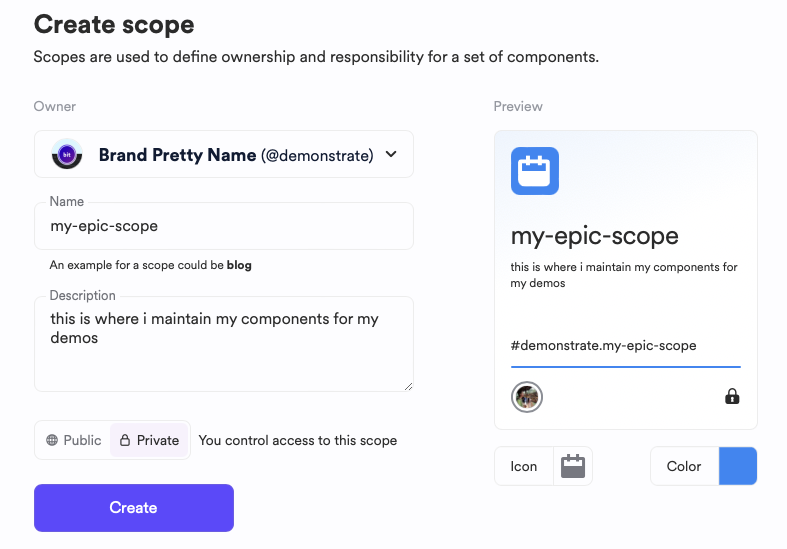
Complete the form and submit:
- Owner: (Required) Select the account that will manage the Scope.
- Name: (Required) Provide a unique name for the scope. This name will be used as a prefix for all components managed within the Scope.
- Description: (Optional) Enter freeform text to describe the Scope and its business domain.
- Branding: (Optional) Add an image and color to represent the business domain.
- Visibility: (Required) Choose whether the Scope and its contents are publicly visible or if access is restricted.