For complex solutions, Hope AI utilizes the Harmony library to compose independent business features into cohesive platforms. Harmony is a minimalist open-source library that enables the seamless integration of API-centric features into shell applications, ensuring optimal user experience, performance, safety, and developer experience.
Harmony facilitates an API-first integration approach, promoting consistent and deterministic feature composition. This allows you to combine projects into a single, unified solution, regardless of their number. Harmony-driven composition enables you to break down large projects into manageable, independent features while maintaining the ability to connect them into a larger whole.

Ensure the "Backend" toggle is enabled.
Provide detailed context in your prompts to guide Hope AI's feature selection.
Hope AI proposes a solution that includes a design system, a platform for feature composition, and individual domains for specific features.
While feature sets vary across systems, a composable architecture generally follows a similar structure. Hope AI divides the architecture into distinct business domains.
To standardize UI across features, Hope AI initiates with a Design domain, serving as a design system. If possible, Hope AI will reuse existing design components.
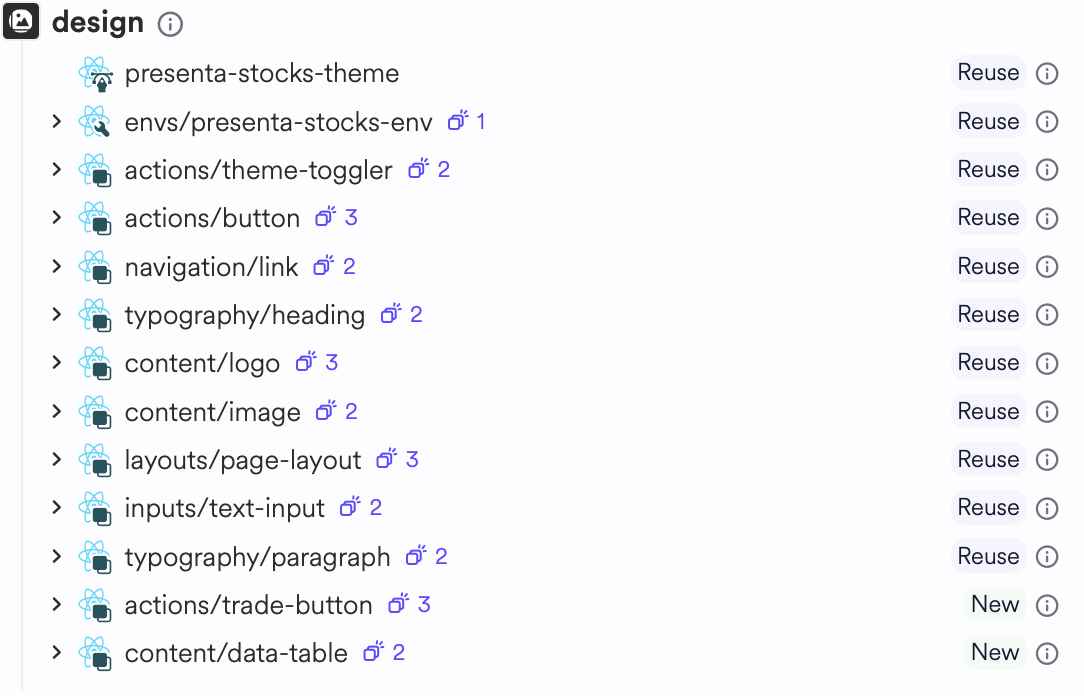
To tailor your design system in more detail, head to the design system system section.
The Platform domain orchestrates the composition of features into a unified application, providing the foundational structure for a cohesive user experience.
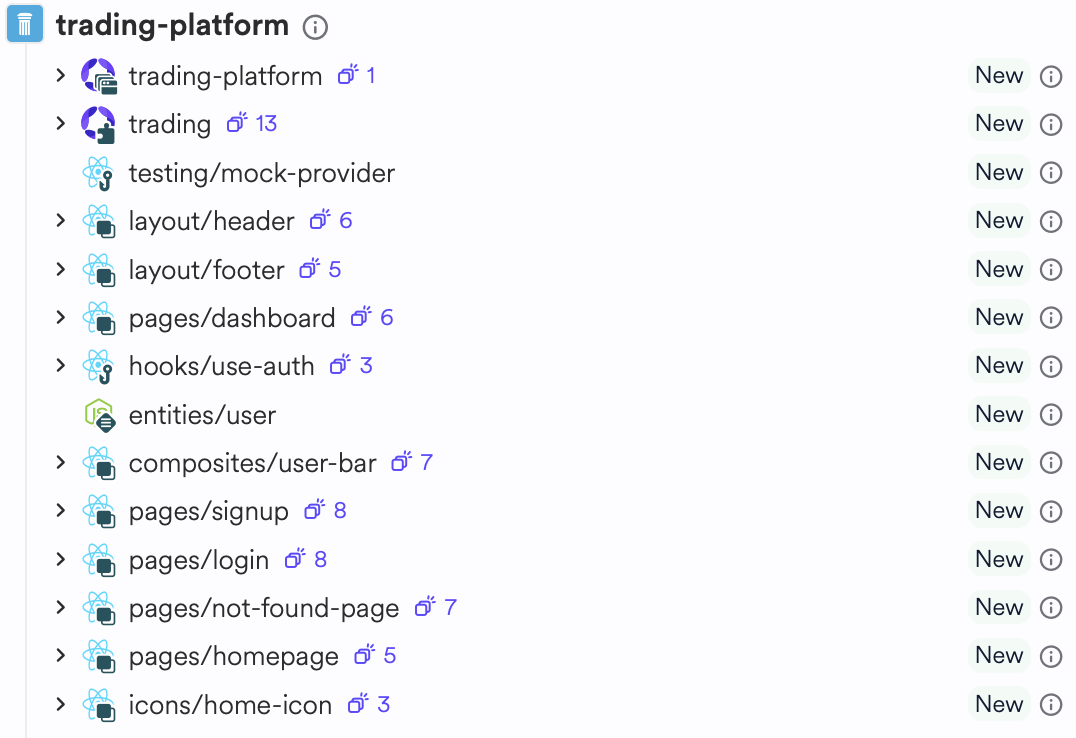
The platform includes the application shell, the platform aspect and the foundational components required by your platform.
Application shell
The application shell composes all the platform features. Enable or disable features by commenting in and out in the manifest file:
import { HarmonyPlatform } from '@bitdev/harmony.harmony-platform'; import { SymphonyPlatformAspect } from '@bitdev/symphony.symphony-platform'; import { StoreAspect } from '@acme/trading-platform.trading-platform'; // import the `trading-platform` feature import { PeopleAspect } from '@acme/people.people'; // import the `trading` feature export const TradingApp = HarmonyPlatform.from({ name: 'pied-piper', /** * business capabilities to include * in the app shell. */ aspects: [ TradingPlatformAspect, // toggle features in and out TradingAspect, StrategiesAspect, ], }); export default TradingApp;

Comment features in and out of platform to easily test, debug or change the features composed into your platform. Learn more about application shell.
Platform aspect
The platform aspect provides the API for features from independent domains to add routes, navigation links or other platform wide actions.
Usually the platform aspect is used by the AI to compose the platform' basic components such as homepage, header, sidebar, page not found and user authentication components.
Learn more about platform aspects.
Hope AI segments the platform into core building blocks, each addressing a specific aspect. These aspects encompass UI components and GraphQL-based backend implementations.
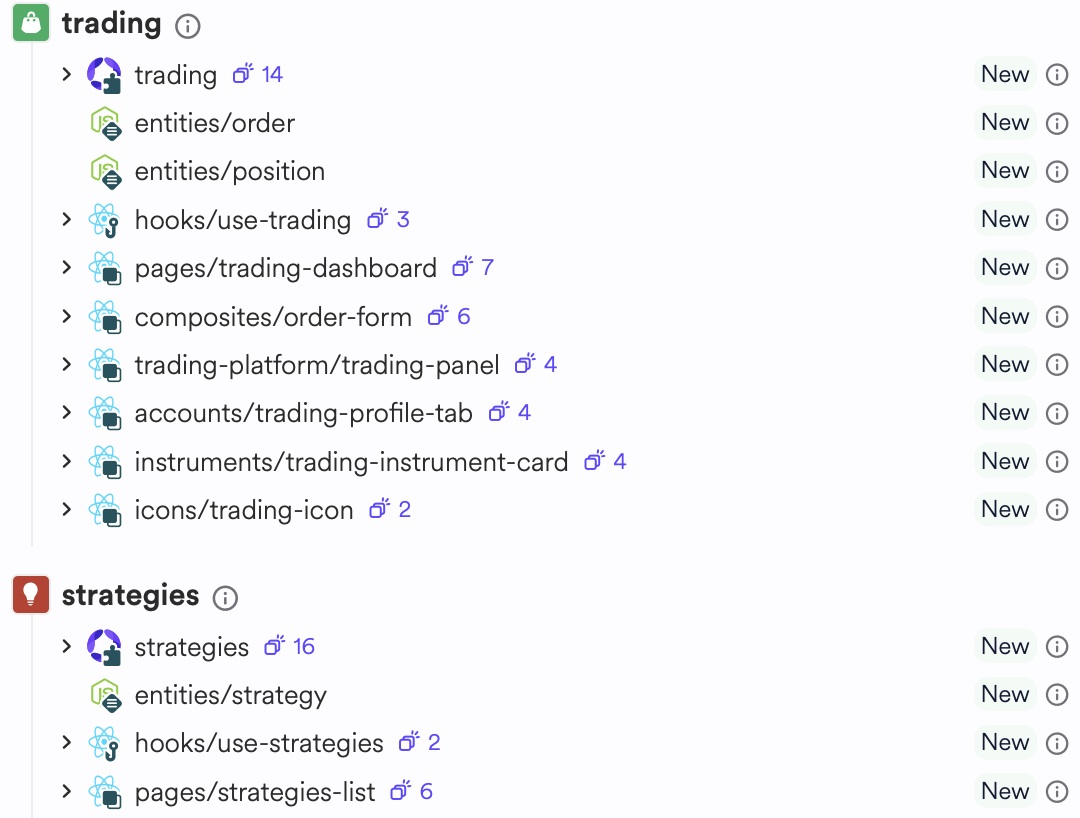
Components are composed to the platform using Aspects. Aspects compose components from a certain responsibility into the platform and allow for orientation when modifying code.
Learn more about composing features.
Navigation is usually managed by the platform aspect and used by aspect browser runtime files (e.g. products.browser.runtime.tsx) across your platform.
acmePlatform.registerNavigationItem([ { name: 'home', label: 'Home', href: '/', weight: 1 }, { name: 'signup', label: 'Signup', href: '/signup', weight: 3, requiresAuth: false } ]);
Add, remove or modify routes by changing the array items registered by aspects in the platform.
Routes are introduced to platforms by the browser runtime of aspects (e.g. products.browser.runtime.tsx), which associate page components listed in the architecture to the matching routes:
symphonyPlatform.registerRoute([ { path: '/', component: () => { return <Homepage />; } }, { path: '/login', component: () => { return <Login />; } } ])
Add, remove or modify routes by changing the array items in each of the aspects.
By default, Hope AI uses MongoDB to store and manage data. Each aspect consists of Typegoose models defined in independent files (e.g. product.model.ts) and later transported to the frontend using Data entities in the aspect API methods.
export class UserModel { @prop({ required: true, unique: true, type: String }) public id!: string; @prop({ required: true, unique: true, type: String }) public username!: string; @prop({ required: true, unique: true, type: String }) public email!: string; @prop({ required: true, type: String }) public password!: string; @prop({ required: true, type: [String] }) public roles!: string[]; // Compare password public async verifyPassword(rawPassword: string): Promise<boolean> { return bcrypt.compare(rawPassword, this.password); } }
Change the model to add, remove or modify properties. Ensure to update the corresponding entity and the GraphQL schemas.
The GraphQL schema of each feature is generated in the aspect GraphQL file (e.g. products.graphql.ts), and uses the aspect API and data entities to serialize responses to the frontend.
The frontend uses React hooks to execute GraphQL API calls and retrieve information from the backend. In the example above: hooks/use-auth is used to handle authentication methods like login or sign up while hooks/use-products the products feature API.
Mock data of each feature composition is loaded to the database in the aspect's node provider, upon the initial service load:
symphonyPlatform.registerOnStart(async () => { const existingDocs = await userModel.find().limit(1); const hasDocs = Boolean(existingDocs.length); if (hasDocs) return undefined; await userModel.insertMany(userModelMock); return undefined; });
Mock data is persisted only if the database collections are empty. Comment the lines out to pause writing mock data.
Open the cloud workspace by clicking the "Edit code" button. Run the platform manually to check for errors:
List the apps in the workspace:
bit app list
Run the app:
bit run my-platform
Restart the dev server when encouraging issues can resolve.
While Hope AI's ability to build complex solutions is impressive, it's advisable to begin with specific, smaller requirements and gradually expand capabilities.
Hope AI is designed to facilitate the creation of basic, independent projects, which can later be interconnected through components (learn more). This approach allows you to introduce Harmony or add new features incrementally, even across different sessions.
Hope AI leverages Harmony to deliver comprehensive full-stack solutions. By default, it includes:
- React and React Router for frontend development.
- GraphQL and ExpressJS for backend and API gateway.
- Microservices architecture.
- Kubernetes deployment.
- Server-side rendering and client-side hydration with Webpack, RSpack, or Vite.
- SEO optimizations with React Helmet.
- MongoDB for data persistence.
- Introduction to Harmony
- Learn why we built Harmony
- Get started with Harmony (without Hope AI)
- Have issues? Read the troubleshooting guide