Bit Components are fundamental building blocks of composable software, and other components or applications may depend on them. Actions like renaming, deprecating, or deleting components can impact these dependents, potentially affecting component availability.
Deprecating components in Bit is useful for guiding users away from a component and ensuring a smooth transition. When a component is deprecated, it's marked accordingly in the component's UI, CLI, and package.json, informing consumers and providing an opportunity to suggest an alternative component ID.
Deprecating components using Cloud Workspaces
Since a component might be used extensively within the same scope, it's recommended to open the entire scope for editing. This allows you to deprecate the component and refactor all components that use it in a single change.
- Navigate to the scope containing the component you want to deprecate.
- Click the "Edit Scope" button.
- Open the terminal and execute the following command:
bit deprecate foo/bar --new-id sun/moon

Once you're satisfied with all changes, create a lane from the IDE.
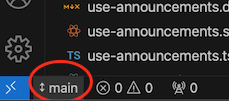
Provide a name for your lane.

Then, go to the "Source Control" tab and select "Snap & Export."
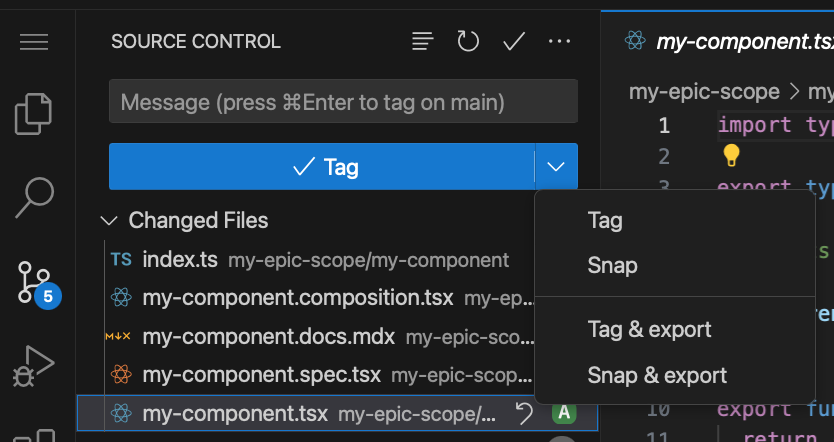
A dialog will appear, providing a link to track the build process of your changes.
Deprecating Specific Versions
You can deprecate specific versions or ranges of a component:
bit deprecate hello-world --range ^1.1.2
Reverting component deprecation
To undeprecate a component that has been deprecated, use the following command:
bit undeprecate
You can rename a component and even move components to different scopes using the bit rename command. Rename will create a new component using the implementation of the old one but with the new name. The old component will be marked as deprecated.
bit rename foo/bar sun/moon --refactor
To move a component to a different Scope:
bit rename foo/bar foo/bar --scope account.new-scope --refactor
Use the --refactor option to have Bit update import statements in dependent components.
Deleting components in Bit requires a careful approach to ensure integrity and avoid unintentional disruptions in dependent projects. Once a component is deleted, it will no longer be discoverable and won't be available for use as a dependency.
Deprecate instead of delete
It's recommend to begin by deprecating components deleting them later.
Delete component using Cloud Workspaces
Since a component might be used extensively within the same scope, it's recommended to open the entire scope for editing. This allows you to delete the component and refactor all components that use it in a single change.
- Navigate to the scope containing the component you want to delete.
- Click the "Edit Scope" button.
- Open the terminal and execute the following command:
bit delete my-org.my-scope/foo/bar
- Refactor all other components in the scope to no longer use the deleted component.
- Once you're satisfied with all changes, create a lane from the IDE.
- Provide a name for your lane.
- Then, go to the "Source Control" tab and select "Snap & Export."
- A dialog will appear, providing a link to track the build process of your changes.
From this point, you can submit changes through change requests or release a new version of the component directly.
Recovering deleted components
Use the following command to recover a removed component:
bit recover my-org.my-scope/foo/bar
- Rename components (from Bit.dev)
- Change scope (from Bit.dev)
- Deprecating components (from Bit.dev)
- Deleting components (from Bit.dev)