Organizations enable companies and open-source projects to establish a shared account for owning and collaborating on Bit Components. An organization acts as the owner of components, possessing its own distinct identity and brand. An organization can have any number of personal accounts as members, granting them access and permissions to the content managed under the organization's account.
You can invite anyone to become a member of an organization, and personal accounts can be members of multiple organizations. You can also assign members specific roles, such as administrators. Organizations have their own settings and configuration options for Bit Cloud features, allowing you to control the developer experience for your collaborators.
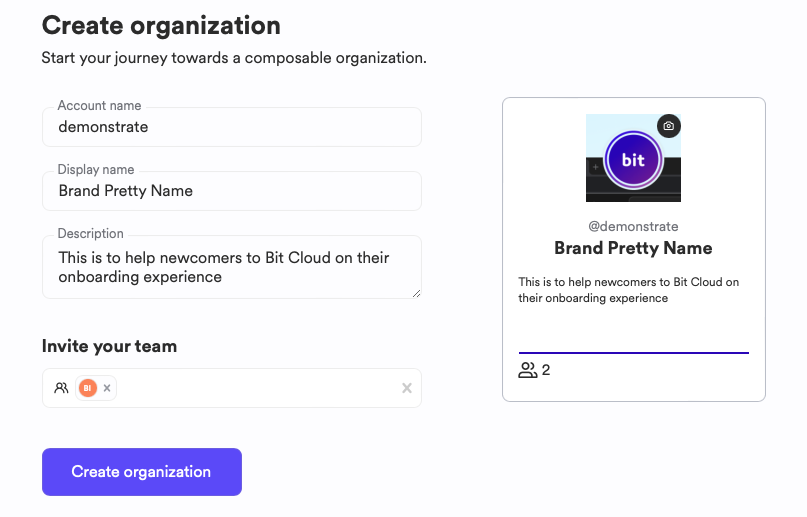
Creating a new organization:
You can access the organization creation page in two ways:
- Click the "+" action in the header menu and select "Create organization."
- Go directly to the Create Organization page.
Complete the form and submit:
- Account Name: (Required) A unique name for the organization. This will be used as a prefix for all components managed by the organization.
- Display Name: (Optional) The brand name for the organization, displayed on the organization's profile.
- Description: (Optional) Freeform text describing your organization.
- Logo: (Optional) An image representing the organization.
- Invitees: A list of existing Bit Cloud accounts or email addresses of people to invite to the organization.