Hope AI consistently uses tried and true coding patterns to provide with an effective and efficient custom platforms. This document aims to walk you through them, so you can better understand how to scale its work, debug and expand.
All platforms generated by Hope AI uses Bit Dev and Harmony.
- Overview
- Design System & Theming
- Navigation & Routing
- State Management
- Authentication & Authorization
- Database & Data Management
Hope AI generates codebases that look like this, where each domain owns its fullstack functionality:
my-platform/ ├── design/ # Design System with shared UI components & theme ├── products/ # Products Domain │ ├── ui/ # React components │ ├── hooks/ # Data fetching and other hooks │ ├── entities/ # Domain models ├── shopping-cart/ # Shopping cart Domain └── platform/ # Application shell, routing, auth, layout and other platform engineering

Each directory represents a business domain, containing everything needed for that business capability.
The complete product is a composition of all features and the platform to stitch them together using the Application Manifest:
// store-platform/store.ts export const StorePlatform = HarmonyPlatform.from({ name: 'store-platform', platform: [SymphonyPlatformAspect], // Core platform aspect aspects: [ ProductsAspect, // Product catalog ShoppingCartAspect, // Shopping cart ] });
Within each domain you find several components and an Aspect that connects both Frontend and Backend code to a single feature module. An Aspect defines frontend functionality in the *.browser-runtime.ts file and backend in *.node-runtime.ts communicating using an API Gateway.
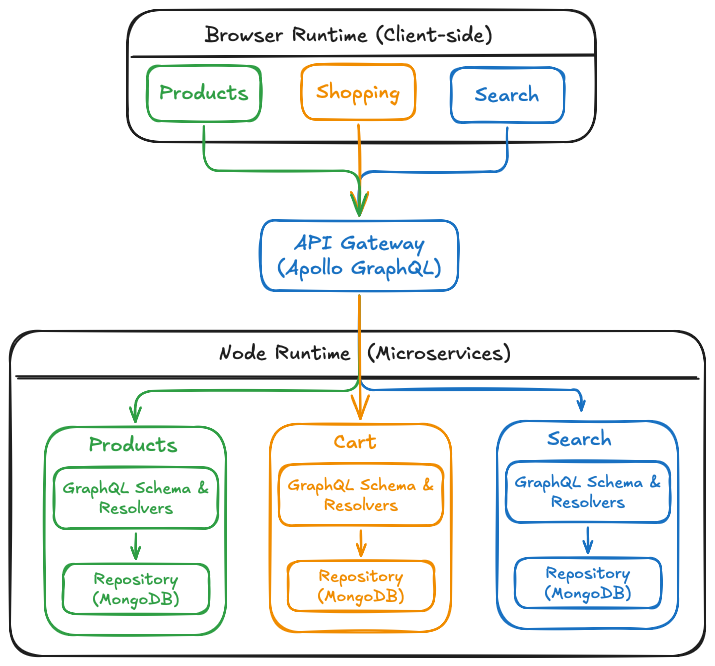
This approach allows Hope AI to generate a fully functional platform where all business features work together seamlessly while remaining independently developed.
Learn More:
- Introduction to Harmony.
- Application Shell.
- Compositing features.
- Platform Engineering.
- Platform Deployment
The application uses a centralized theme system:
// design/theme/theme-provider.tsx export function ThemeProvider({ children }) { const [theme, setTheme] = useState<'light' | 'dark'>('light'); return ( <ThemeContext.Provider value={{ theme, setTheme }}> <div className={styles[theme]}>{children}</div> </ThemeContext.Provider> ); }
By default components access theme through CSS modules:
// component.module.scss @import '@design/theme/variables'; .button { background: var(--primary-color); color: var(--text-on-primary); }
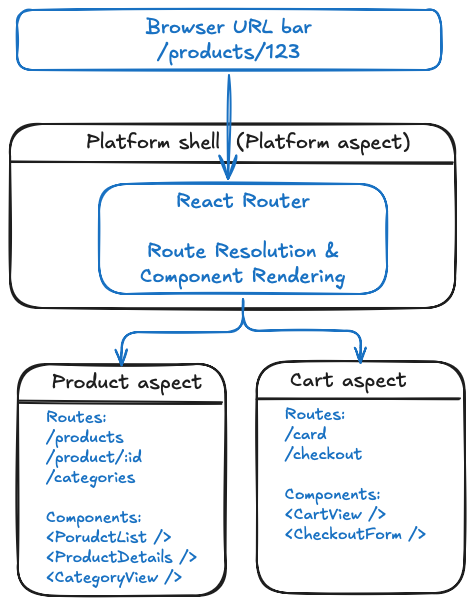
Using React Router under the hook you get a unified routing system where each aspect can register its own routes and components.
// products/products.browser.runtime.ts export class ProductsBrowser { static dependencies = [SymphonyPlatformAspect]; static async provider([symphonyPlatform]: [SymphonyPlatformBrowser]) { // Register routes for this aspect symphonyPlatform.registerRoute([ { path: '/products', element: () => <ProductList /> }, { path: '/products/:id', element: ({ params }) => <ProductDetail productId={params.id} /> }, ]); return new ProductsBrowser(); } }
The platform loads all aspects, each aspect's browser runtime registers its routes, and they are merged into the React Router configuration.
State is managed through custom React hooks that encapsulate data fetching and state logic:
// products/hooks/use-products.ts export function useProducts() { const [products, setProducts] = useState<Product[]>([]); const [loading, setLoading] = useState(true); useEffect(() => { fetchProducts().then(data => { setProducts(data); setLoading(false); }); }, []); return { products, loading }; }
When global state is needed, use React Context wrapped in custom providers:
// shopping-cart/context/cart-context.tsx export const CartContext = createContext<CartContextType>(...); export function CartProvider({ children }) { // Cart state management return <CartContext.Provider value={...}>{children}</CartContext.Provider>; }
Hope AI generates authentication as part of the Platform Aspect using a session-based flow:
Login Page → Auth Hook → GraphQL Resolver → Auth Service → MongoDB → Session Store → Protected Routes
// store-platform/hooks/use-auth/use-auth.tsx - Session management export function useAuth() { const [user, setUser] = useState(null); const login = async (credentials) => { const response = await fetch('/api/login', { method: 'POST', body: JSON.stringify(credentials) }); setUser(await response.json()); }; return { user, login, logout }; } // store-platform/ui/protected-route.tsx - Route protection export function ProtectedRoute({ children }) { const { user } = useAuth(); return user ? children : <Navigate to="/login" />; } // store-platform/store-platform/store-platform.node.runtime.ts - Backend authorization static async provider( [symphonyPlatform]: [SymphonyPlatformNode], config: ToyStorePlatformConfig, [onSignupHookSlot]: [OnSignupHookSlot] ) { ... symphonyPlatform.registerMiddlewares([ // implement a middleware to authenticate users and attach the user to the request. ]); ... }
Each aspect owns the complete data fetching flow from frontend to database. When you query for products, the Products Aspect handles everything:
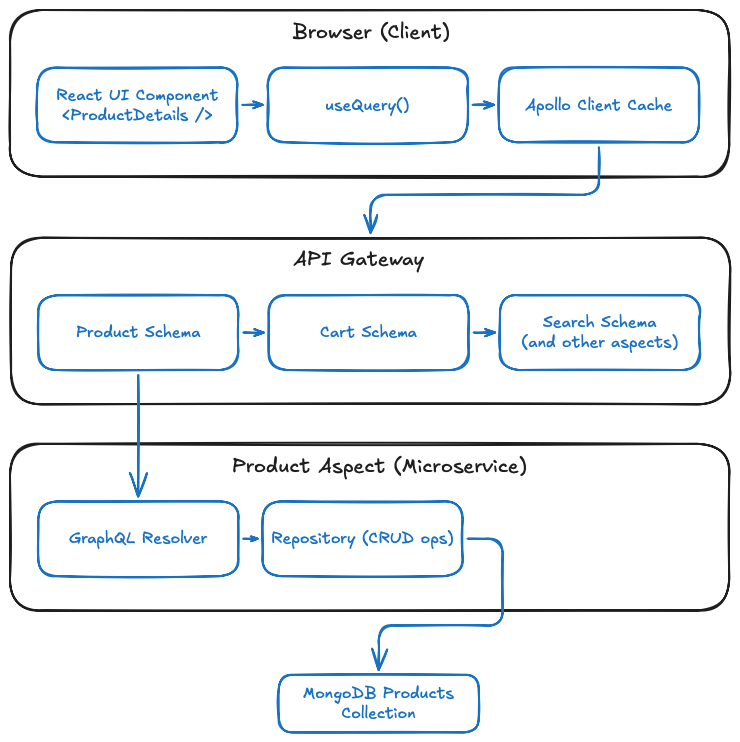
This single aspect ownership means the Products Aspect provides the React UI components, GraphQL schema, resolvers, repository, and database entities - ensuring full-stack cohesion and independent development.
Each aspect implements its own repository for data access using a consistent CRUD pattern:
// products/products/product-repository.ts export class ProductsRepository { constructor(private db: Db) { this.collection = db.collection('products'); } async getProducts(): Promise<Product[]> { return this.collection.find({}).toArray(); } async getProductById(id: string): Promise<Product | null> { return this.collection.findOne({ _id: new ObjectId(id) }); } async createProduct(product: Omit<Product, '_id'>): Promise<Product> { const result = await this.collection.insertOne(product); return { ...product, _id: result.insertedId }; } }
// products/products.graphql.ts - Schema definition export const productSchema = gql` type Product { id: ID!, name: String!, price: Float! } type Query { products: [Product!]! } `; // products/ui/product-list.tsx - Client-side data fetching export function ProductList() { const { data, loading, error } = useQuery(GET_PRODUCTS); if (loading) return <LoadingSpinner />; if (error) return <ErrorMessage error={error} />; return ( <div>{data.products.map(product => <ProductCard key={product.id} product={product} /> )}</div> ); }
Hope AI projects use MongoDB as the default database, with each aspect managing its own collections through repository patterns.
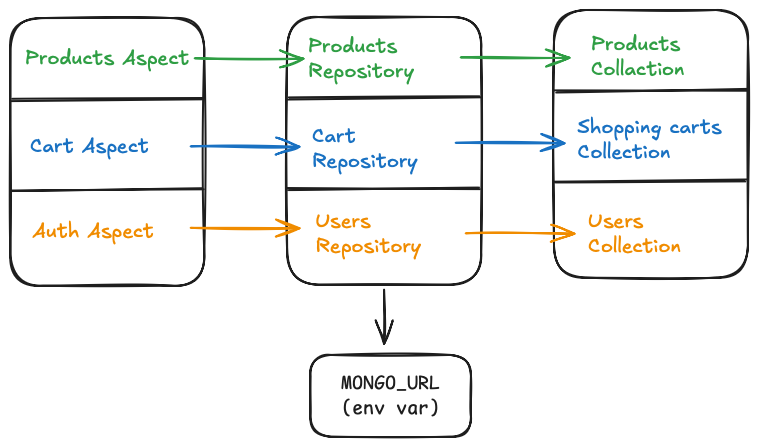
Each aspect owns its collections and provides data models and repositories for CRUD operations.
// products/entities/product.entity.ts - Type definitions export interface Product { _id?: ObjectId; name: string; price: number; category: string; inStock: boolean; createdAt: Date; } // products/products/product.model.ts /** * Represents a specific variant of a product. */ export class ProductVariantModel { @prop({ required: true, type: String }) public name!: string; ... } /** * Represents a product in the store. */ @modelOptions({ schemaOptions: { timestamps: true } }) @index({ id: 1 }, { unique: true }) @index({ name: 'text', description: 'text' }) // For text search export class ProductModel { @prop({ unique: true, required: true, type: String, default: () => uuidv4() }) public id!: string; ... } /** * Mock data for products. */ export const mockProductsData: ProductModel[] = [ { id: uuidv4(), name: 'Chihuahua Plush Toy', ... }, ];
Data is seeded to collections during platform initialization in the registerOnStart platform API:
// products/products/products.node.runtime.ts static async provider( [symphonyPlatform, storePlatform, shoppingCart]: [SymphonyPlatformNode, storePlatformNode, ShoppingCartNode], config: ProductsConfig, ) { ... symphonyPlatform.registerOnStart(async () => { ... }); }
- Introduction to Harmony
- Learn why we built Harmony
- Get started with Harmony (without Hope AI)
- Have issues? Read the troubleshooting guide